Cloud IAM Policies: The Hidden Lever for Security Control
Identity is the new perimeter, and poorly written access policies allow attackers to move laterally without triggering any network alerts or alarms.
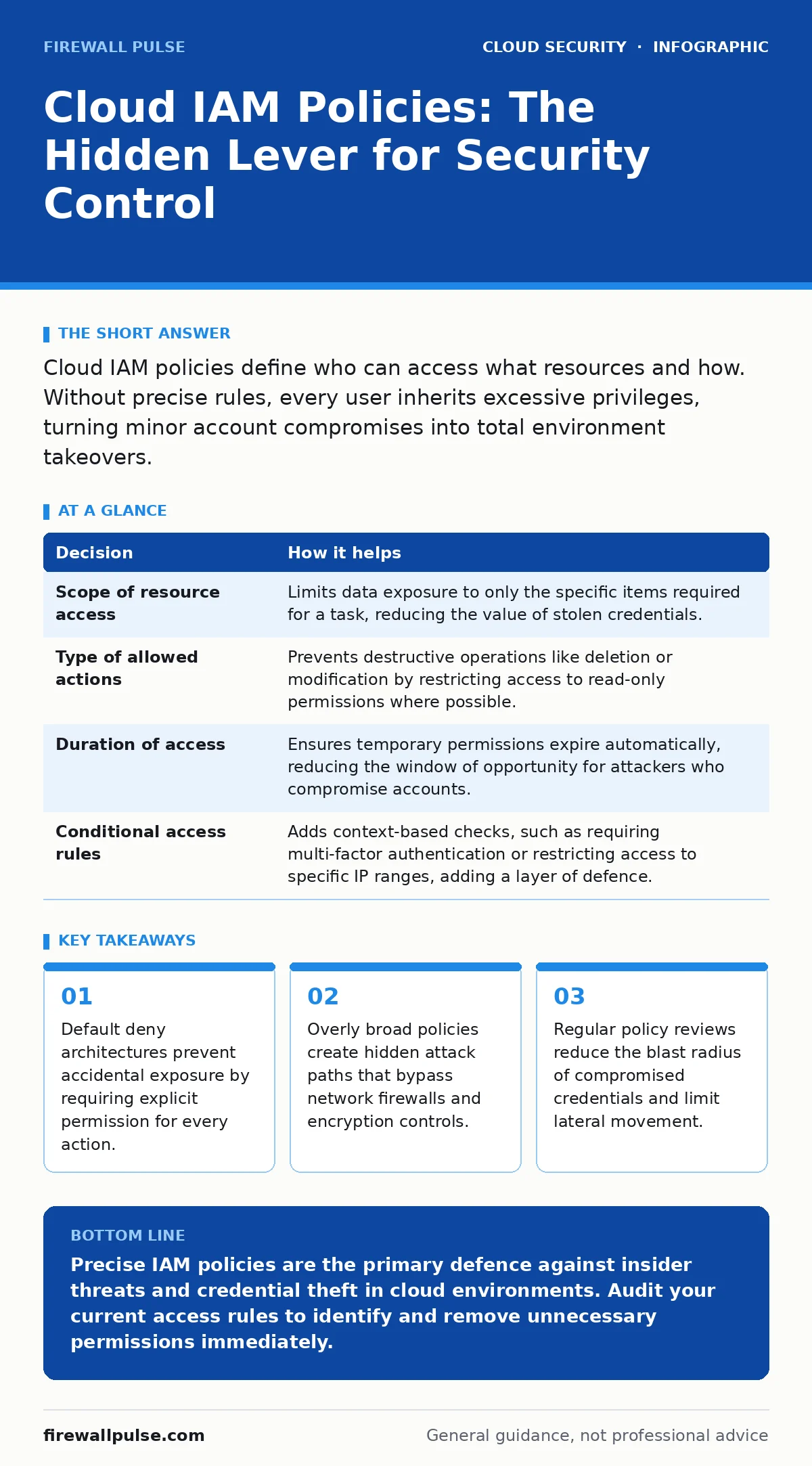
Cloud IAM policies define who can access what resources and how. Without precise rules, every user inherits excessive privileges, turning minor account compromises into total environment takeovers.
The Identity Perimeter Shift
Network firewalls once defined the boundary of your security. That model has collapsed in cloud environments. The perimeter is no longer a physical or virtual wall; it is the identity of the user or service making the request. Every interaction with cloud infrastructure requires an identity to authenticate and an identity access management policy to authorise the action. If the policy permits the action, the system executes it. If the policy is missing or too broad, the system assumes permission by default in many legacy configurations, or simply fails to restrict access effectively. This shift means that securing the network is insufficient. You must secure the identities that traverse it. A compromised credential is only dangerous if the associated policy grants access to sensitive data or administrative functions. Therefore, the quality of your security depends entirely on the precision of these access rules.
Decisions Informed by Policy Design
IAM policies are not just technical configurations; they are business decisions encoded in machine-readable language. Each policy statement answers three specific questions: who is acting, on what resource, and by which action. The "who" can be a human user, a service account, or an application. The "resource" is the specific object, such as a storage bucket or database instance. The "action" is the operation, such as read, write, or delete. Designing these policies forces you to map your business logic to security constraints. You must decide which teams need read-only access versus write access. You must determine which services require cross-account permissions. These decisions inform your architecture. If you allow a web application to write directly to a database, you create a different risk profile than if you route writes through a managed API gateway. The policy dictates the flow of data and the potential for abuse.
| Decision | How it helps |
|---|---|
| Scope of resource access | Limits data exposure to only the specific items required for a task, reducing the value of stolen credentials. |
| Type of allowed actions | Prevents destructive operations like deletion or modification by restricting access to read-only permissions where possible. |
| Duration of access | Ensures temporary permissions expire automatically, reducing the window of opportunity for attackers who compromise accounts. |
| Conditional access rules | Adds context-based checks, such as requiring multi-factor authentication or restricting access to specific IP ranges, adding a layer of defence. |
What Goes Wrong Without Precision
Imagine a development team that needs access to a staging environment. Instead of creating a specific policy for the staging resources, an administrator applies a broad policy that allows access to all storage buckets in the account. This seems convenient. It speeds up development. However, it creates a silent vulnerability. If an attacker compromises a developer’s credentials, they immediately gain access to production data stored in other buckets. The network logs show normal traffic because the request came from a legitimate user. The firewall sees no inbound attack from the internet. The intrusion detection system sees no malicious payload. The breach happens entirely within the authorised identity framework. This is the danger of overly permissive policies. They hide the breach inside the noise of legitimate activity. Without precise boundaries, lateral movement is invisible to traditional security tools.
How Teams Use Policies Effectively
Effective teams treat IAM policies as code. They version control their access rules, review changes before deployment, and test them in isolated environments. This approach allows for rapid iteration and rollback if a policy change breaks an application. Teams also adopt the principle of least privilege. This means granting only the permissions necessary to perform a task, and nothing more. For example, a backup service should only have permission to read specific resources and write to a designated backup storage area. It should not have permission to list all resources or modify security settings. This minimises the damage if the service account is compromised. Teams also use temporary credentials where possible. Instead of long-lived static keys, they issue short-lived tokens that expire after a set period. This reduces the risk of key leakage and limits the time an attacker can exploit a stolen credential.
The Hidden Cost of Complexity
As cloud environments grow, the number of IAM policies increases exponentially. This complexity introduces a hidden cost: management overhead. Teams spend significant time reviewing and updating policies. They struggle to understand the cumulative effect of multiple policies applied to a single identity. This can lead to policy fatigue. Administrators may approve overly broad permissions simply to unblock development work. They may skip regular reviews because the process is tedious. This drift away from least privilege is gradual and often unnoticed. The result is a security posture that degrades over time. The initial precision is lost in the noise of daily operations. To combat this, teams must automate policy validation. Tools can scan policies for known anti-patterns, such as wildcard permissions or access to sensitive resources without conditions. Automation ensures that security standards are maintained even as the environment scales.
See also: Tenant isolation: why shared infrastructure needs strict boundaries
Contrasting Approaches
Integration with Broader Security
IAM policies do not exist in isolation. They interact with other security controls. For instance, secure cloud APIs rely on IAM to enforce access controls at the application layer. Without proper IAM, even a well-configured API can be abused by an authenticated user with excessive permissions. Similarly, cloud logging gaps can hide policy misuse. If you do not log every IAM decision, you cannot detect when a user acts outside their intended scope. Therefore, IAM must be paired with comprehensive logging and monitoring. You must also consider workload identity. Services running in containers or serverless functions need their own identities and policies. If these identities are misconfigured, they can become entry points for attackers. Understanding the interplay between IAM and these other controls is vital for a holistic security strategy.
Moving Forward
The goal is not to create perfect policies from the start. It is to create a process that continuously refines them. Start by auditing existing permissions. Identify accounts with excessive privileges and reduce them. Implement automated checks to prevent new broad policies from being deployed. Educate developers on the security implications of their access requests. Make security a shared responsibility. By treating IAM as a dynamic, evolving component of your architecture, you can adapt to new threats and business needs. The precision of your policies determines the resilience of your cloud environment. Invest in the discipline of least privilege, and you will reduce the risk of catastrophic breaches.
Key takeaways
- Default deny architectures prevent accidental exposure by requiring explicit permission for every action.
- Overly broad policies create hidden attack paths that bypass network firewalls and encryption controls.
- Regular policy reviews reduce the blast radius of compromised credentials and limit lateral movement.
Precise IAM policies are the primary defence against insider threats and credential theft in cloud environments. Audit your current access rules to identify and remove unnecessary permissions immediately.
Frequently asked questions
How do I know if my IAM policies are too broad?
Look for wildcard permissions that allow access to all resources or actions. Check for accounts with administrative privileges that do not require them. Use policy simulation tools to test access scenarios.
Should I use role-based or attribute-based access control?
Role-based access control is simpler for static roles, while attribute-based access control offers more flexibility for dynamic conditions. Many teams use a hybrid approach, combining roles for base permissions and attributes for contextual restrictions.
How often should I review IAM policies?
Reviews should be continuous. Automate scanning for policy violations and trigger reviews when new resources are created or when personnel changes occur. Regular manual audits should complement these automated checks.
What is the biggest risk of misconfigured IAM?
The biggest risk is lateral movement. An attacker with a compromised account can move through your environment, accessing sensitive data and escalating privileges, all while appearing as a legitimate user.
How this guide was produced: written by the Firewall Pulse editorial team with AI assistance, checked against the public references listed below, and reviewed when the facts change. See our editorial policy or report an error.