How Cloud Backup Works: The Hidden Mechanics and Limits
Cloud backup relies on immutable storage objects and client-side encryption to prevent ransomware, but network latency and API rate limits dictate your actual recovery speed.
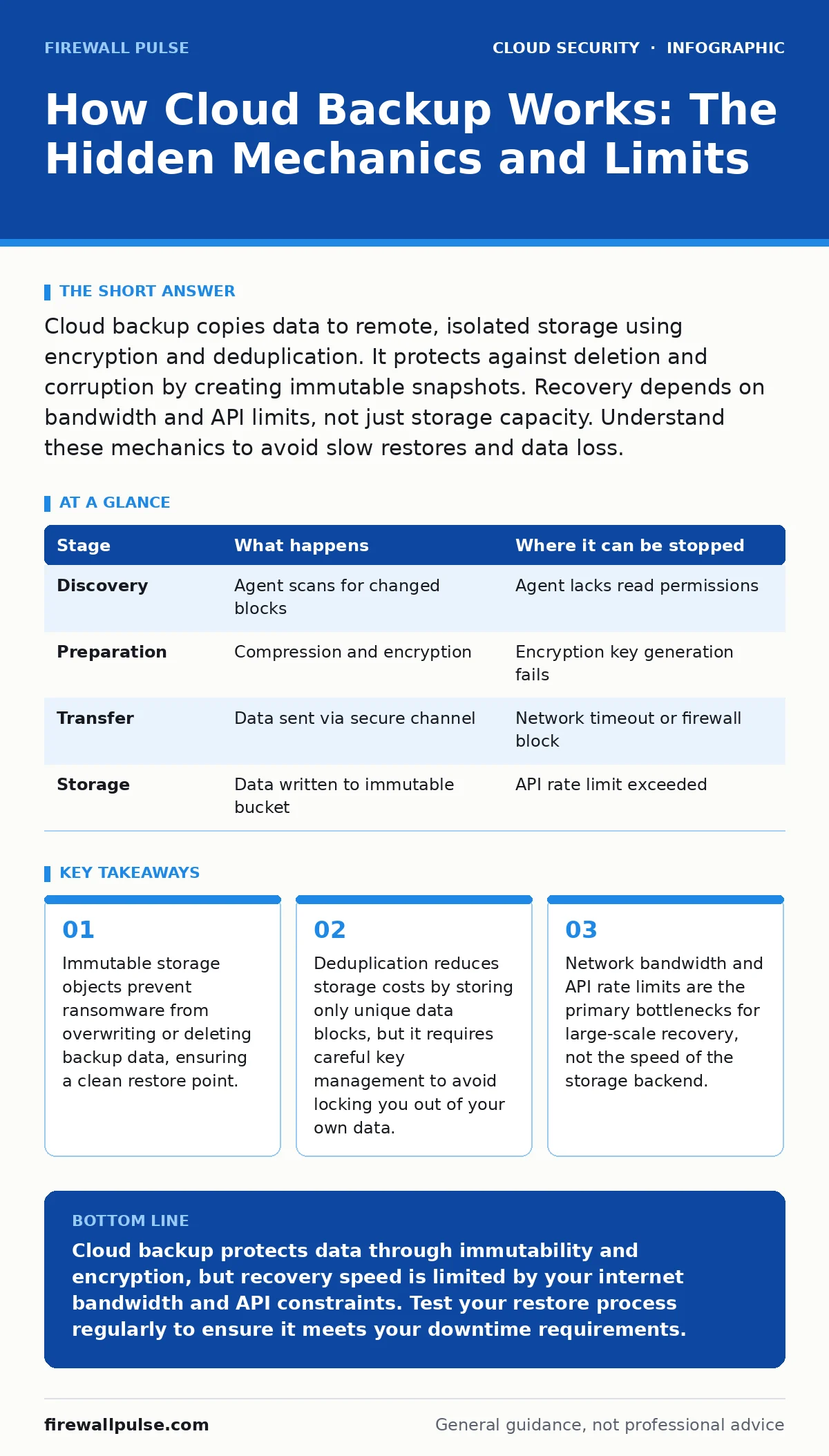
Cloud backup copies data to remote, isolated storage using encryption and deduplication. It protects against deletion and corruption by creating immutable snapshots. Recovery depends on bandwidth and API limits, not just storage capacity. Understand these mechanics to avoid slow restores and data loss.
The Initial Data Capture Process
The backup process begins with the agent or API call identifying which data has changed since the last snapshot. This is known as incremental backup. The system scans file metadata, such as timestamps and size, to detect modifications. It does not re-read unchanged files, which saves time and bandwidth.
The agent then reads the changed data blocks. It applies compression algorithms to reduce the data size before transmission. Compression works by finding repetitive patterns in the data and replacing them with shorter references. This step is critical because cloud bandwidth is expensive and finite.
Next, the system encrypts the data. Modern backups use client-side encryption, meaning the data is scrambled before it leaves your environment. The cloud provider never sees the plaintext data. This ensures that even if the storage infrastructure is compromised, the attacker cannot read the contents without your keys.
| Stage | What happens | Where it can be stopped |
|---|---|---|
| Discovery | Agent scans for changed blocks | Agent lacks read permissions |
| Preparation | Compression and encryption | Encryption key generation fails |
| Transfer | Data sent via secure channel | Network timeout or firewall block |
| Storage | Data written to immutable bucket | API rate limit exceeded |
Data Deduplication and Storage Efficiency
Once the data is encrypted, the system performs deduplication. This process identifies identical data blocks and stores only one copy. If you have ten servers with the same operating system files, the backup system stores those files once and creates pointers for the other nine.
This mechanism significantly reduces storage costs. However, it introduces a dependency on the deduplication index. If the index is corrupted, you may lose the ability to reconstruct the original files, even if the data blocks are intact. This is a hidden risk in many backup architectures.
The deduplicated data is then packaged into objects. These objects are designed to be immutable. Immutability means that once the object is written, it cannot be modified or deleted for a set period. This feature is your primary defence against ransomware, which often attempts to delete backups to force payment.
The Transfer Mechanism and Network Constraints
The encrypted, deduplicated data is transmitted to the cloud provider. This transfer uses standard protocols like HTTPS. The data travels through multiple network hops, which can introduce latency. High latency can cause timeouts, especially for large files or slow connections.
Cloud providers impose rate limits on their APIs. These limits control how many requests you can make per second. If your backup job tries to upload too many small files simultaneously, it may hit these limits. The job will then throttle or fail. This is a common issue that users do not anticipate.
You must configure your backup software to respect these limits. Throttling the upload speed can prevent failures but will increase the time required for the backup window. Balancing speed and reliability is a constant trade-off in cloud backup design.
Immutable Storage and Retention Policies
The data arrives at the cloud storage endpoint. It is written to a specific bucket or container. The immutability feature is enforced at the storage layer. This means that even administrators with high-level access cannot delete the data before the retention period expires.
Retention policies define how long each backup version is kept. You might keep daily backups for thirty days and weekly backups for a year. These policies are automated. The system automatically deletes expired backups, freeing up space. This automation reduces the risk of human error in managing storage costs.
However, immutability can be a double-edged sword. If you accidentally back up sensitive data that should not be stored, you cannot delete it immediately. You must wait for the retention period to expire. This has legal and compliance implications that you must consider before setting long retention times.
Recovery Mechanics and Bandwidth Bottlenecks
Recovery is the reverse of the backup process. You select the snapshot you wish to restore. The system retrieves the immutable objects from storage. It then decrypts the data using your client-side keys. This step happens before the data is sent back to your environment.
The decrypted data is reassembled. The system follows the pointers in the deduplication index to reconstruct the original files. This process is computationally intensive. If the index is large, the reconstruction can take significant time. This is why recovery time objectives (RTO) are often longer than expected.
Finally, the data is transferred back to your systems. This is where bandwidth becomes the critical constraint. Restoring terabytes of data over a standard internet connection can take days. You cannot recover quickly if your internet connection is slow. This is a fundamental limit of cloud backup.
See also: Implement Cloud Compliance: A Step-by-Step Guide for Secure Infrastructure
The Limits of Cloud Backup Protection
Cloud backup is not a substitute for high availability. It is a disaster recovery tool. It protects against data loss, not service interruption. If your primary system fails, you must wait for the backup to restore. This downtime can be unacceptable for critical applications.
It also does not protect against logic errors in your application. If your application writes corrupt data, the backup will store that corrupt data. You cannot distinguish between a good backup and a bad one without validation. Regular testing of your restores is necessary to ensure data integrity.
Furthermore, cloud backup relies on the security of your credentials. If an attacker gains access to your cloud account, they can potentially disable your backup jobs or delete old backups. You must secure your access keys and use multi-factor authentication. See our guide on cloud IAM policies for details on managing these permissions.
Integrating with Broader Security Strategies
Backup is one layer of your defence. It must work with other security controls. For instance, if your containers are compromised, the backup may capture the malicious code. You need to ensure your images are secure before they are deployed. Refer to our guide on insecure container images for best practices.
Logging is also critical. You need to know when backups fail or when someone accesses the backup data. Gaps in logging can hide malicious activity. Check our guide on cloud logging gaps to understand where visibility might be missing.
Finally, ensure your compliance requirements are met. Some regulations require data to be stored in specific regions or for specific durations. Cloud backup providers offer features to help with this, but you must configure them correctly. See cloud compliance for a deeper look at regulatory obligations.
Managing Long-Term Costs and Complexity
Storage costs accumulate over time. As you retain more backups, the cost increases. Deduplication helps, but it is not a silver bullet. You must monitor your storage usage and adjust retention policies accordingly. Deleting unnecessary backups can save significant money.
Complexity also grows with scale. Managing backups for hundreds of servers requires automation. Manual processes are error-prone and slow. Invest in tools that can automate the backup and recovery process. This reduces the burden on your operations team.
Remember that cloud backup is a balance. You must balance cost, speed, and security. There is no perfect solution. You must choose the settings that best fit your risk tolerance and business needs. Regularly review these settings to ensure they remain effective.
Key takeaways
- Immutable storage objects prevent ransomware from overwriting or deleting backup data, ensuring a clean restore point.
- Deduplication reduces storage costs by storing only unique data blocks, but it requires careful key management to avoid locking you out of your own data.
- Network bandwidth and API rate limits are the primary bottlenecks for large-scale recovery, not the speed of the storage backend.
Cloud backup protects data through immutability and encryption, but recovery speed is limited by your internet bandwidth and API constraints. Test your restore process regularly to ensure it meets your downtime requirements.
Frequently asked questions
Can ransomware delete my cloud backups?
If your backups are stored in immutable storage, ransomware cannot delete them for the duration of the retention period. Ensure immutability is enabled.
How long does it take to restore a cloud backup?
It depends on the amount of data and your internet speed. Large restores can take hours or days. Plan for this latency in your disaster recovery plan.
Is client-side encryption safe?
Yes, it is very safe because the provider cannot read your data. However, you must manage your encryption keys securely, as losing them means losing your data.
Do I need to back up my encryption keys?
Yes, you must back up your keys separately. If you lose the keys, the encrypted backup data is useless. Store key backups in a secure, offline location.
How this guide was produced: written by the Firewall Pulse editorial team with AI assistance, checked against the public references listed below, and reviewed when the facts change. See our editorial policy or report an error.