Backup Testing Mistakes That Leave Systems Exposed
Most organisations treat backup integrity as an afterthought, assuming that if data exists on a secondary drive, it is safe from encryption or deletion.
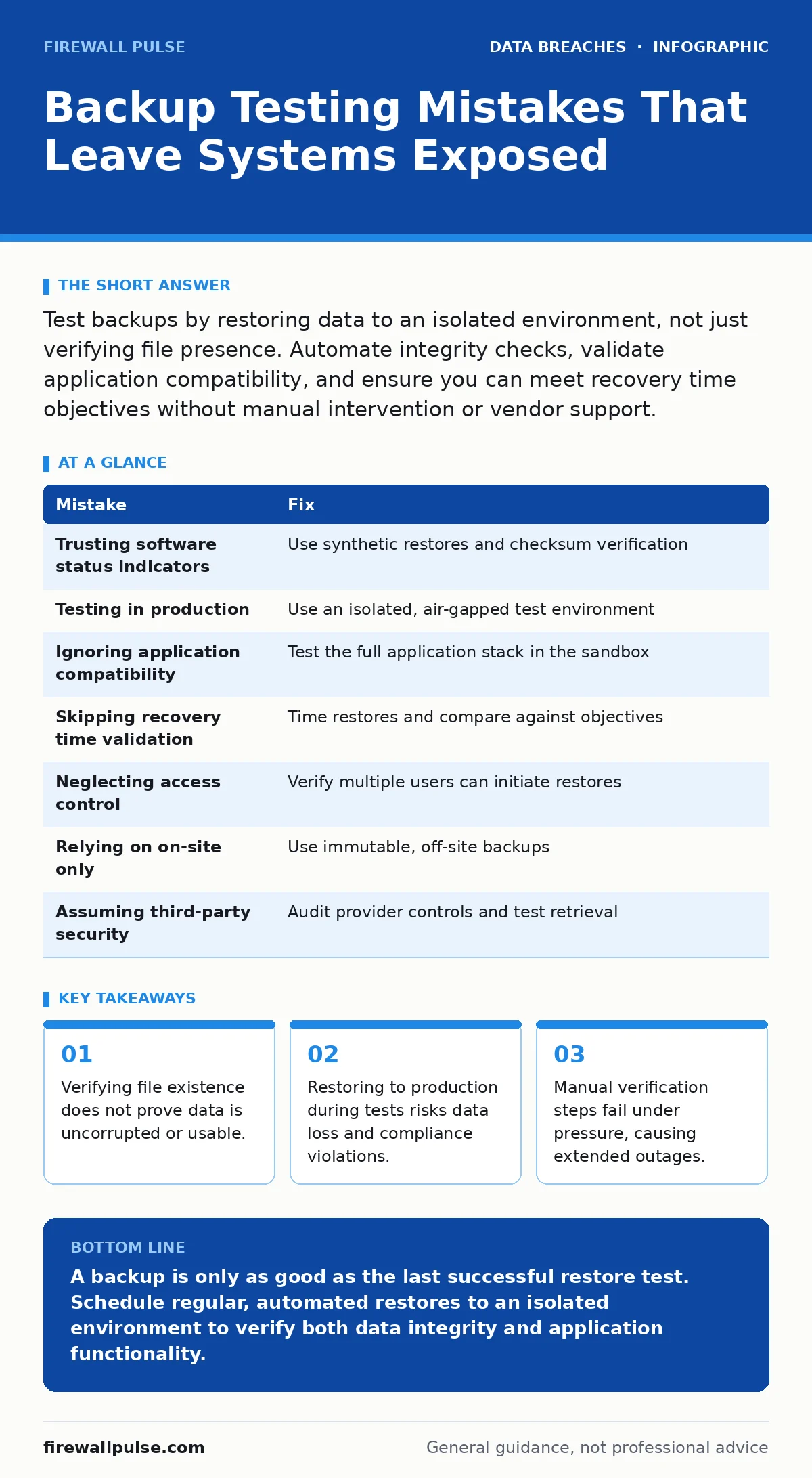
Test backups by restoring data to an isolated environment, not just verifying file presence. Automate integrity checks, validate application compatibility, and ensure you can meet recovery time objectives without manual intervention or vendor support.
Mistake 1: Trusting the Backup Software’s Status Indicator
Backup software often reports a job as "successful" if it copied the data without encountering a hardware error. This status does not confirm that the data is readable, uncorrupted, or free from malware. You assume the system works because the green light is on, but silent corruption can render months of history useless.
Why it hurts:
If the only verification is the software’s log, you may discover during a crisis that the data is gibberish. This happens when storage controllers drop sectors or when ransomware encrypts files before the backup snapshot completes. You waste hours trying to restore data that never existed in a usable form.
The fix:
Implement application-consistent backups where possible, which quiesce the application to ensure transaction logs are synced. Then, schedule regular synthetic restores. These tools read the backup data and verify checksums without writing it back to disk. This catches corruption early without the overhead of a full restore.
Mistake 2: Testing Only in the Production Environment
It is tempting to restore a test file to the live server to prove the backup works. This practice introduces significant risk because the restored data may overwrite current production files or introduce configuration conflicts. You are gambling with live data to prove a point about past data.
Why it hurts:
Restoring to production can cause data loss if the backup is older than the current state. It may also trigger compliance violations if you are handling sensitive personal data. Furthermore, the act of restoring can disrupt services, causing downtime for users who have nothing to do with your testing process.
The fix:
Create an isolated test environment that mirrors production hardware and software. This sandbox allows you to restore full systems without affecting live operations. Ensure this environment is air-gapped or logically separated so that any malware in the backup cannot jump to your production network.
Mistake 3: Ignoring Application Compatibility
Backups often capture raw files or database dumps. Restoring these files does not guarantee the application can read them. Database versions, schema changes, and dependency updates can make old backups incompatible with current software releases. You assume the data is there, but the application cannot interpret it.
Why it hurts:
You may spend days recovering files only to find the application crashes on startup. This is common with complex enterprise systems where minor version differences break compatibility. The result is a prolonged outage while engineers attempt to patch or migrate data manually.
The fix:
Test the entire application stack, not just the data files. Restore the database and the application server together in the test environment. Verify that the application starts, connects to the database, and allows a standard user action. This end-to-end test reveals compatibility issues before they become emergencies.
Mistake 4: Failing to Validate Recovery Time Objectives
Many teams focus on whether data can be restored, but ignore how long it takes. A backup that restores in three days is useless if your business can only tolerate four hours of downtime. You meet the technical requirement but fail the business requirement.
Why it hurts:
Extended downtime leads to revenue loss, reputational damage, and potential breach notification obligations if the outage is due to a cyber incident. You may find that your recovery time objectives are unrealistic given your current infrastructure and backup size.
The fix:
Time every restoration test from initiation to full operational status. Compare this duration against your agreed recovery time objectives. If the test takes longer than allowed, investigate bottlenecks such as network bandwidth or storage speed. Consider incremental backups or faster storage media to reduce restore times.
Mistake 5: Skipping Access Control Verification
Restoring backups requires high-level permissions. If the restoration process relies on a single administrator account or shared credentials, you create a single point of failure. If that account is compromised or the person is unavailable, you cannot restore your data.
Why it hurts:
During a crisis, access to restoration tools must be immediate and reliable. If permissions are broken or accounts are locked, you face unnecessary delays. This also violates the principle of least privilege, where access should be limited to what is necessary.
The fix:
Review and test access controls for backup restoration regularly. Ensure multiple authorised personnel can initiate restores. Use role-based access control to define who can perform which actions. Document the steps required to regain access if primary credentials fail, and test this contingency plan.
See also: How Breach Notification Letters Work: The Hidden Mechanics · How to Stop Source Code Leaks Before They Happen
Mistake 6: Neglecting Off-Site and Immutable Backups
Keeping all backups on-site leaves them vulnerable to physical disasters and ransomware that spreads across the network. If your primary and backup systems share the same storage infrastructure, a single attack can compromise both. You have redundancy, but not resilience.
Why it hurts:
Ransomware attackers increasingly target backup systems specifically. If backups are writable from the production network, attackers can encrypt or delete them. Physical events like fire or flood can destroy on-site media. You lose all copies of your data simultaneously.
The fix:
Maintain off-site backups that are immutable, meaning they cannot be altered or deleted for a set period. Use air-gapped storage or cloud solutions with versioning and retention locks. Test the restoration process from these off-site sources to ensure the data is accessible and intact. This adds a layer of protection against both digital and physical threats.
Mistake 7: Assuming Third-Party Backups Are Secure
If you use a managed service provider or cloud vendor for backups, you may assume their security controls are sufficient. However, you remain responsible for your data’s integrity. The vendor’s practices may not align with your specific recovery needs or compliance requirements.
Why it hurts:
A breach at the provider or a configuration error on their end can expose or lose your data. You may discover too late that their backup strategy does not support your required recovery granularity. This is a classic third-party risk assessment failure.
The fix:
Regularly audit your provider’s backup and restoration processes. Request evidence of their security controls and test your own ability to retrieve data from their systems. Do not rely solely on their status reports. Conduct joint tests if possible to verify end-to-end reliability.
| Mistake | Fix |
|---|---|
| Trusting software status indicators | Use synthetic restores and checksum verification |
| Testing in production | Use an isolated, air-gapped test environment |
| Ignoring application compatibility | Test the full application stack in the sandbox |
| Skipping recovery time validation | Time restores and compare against objectives |
| Neglecting access control | Verify multiple users can initiate restores |
| Relying on on-site only | Use immutable, off-site backups |
| Assuming third-party security | Audit provider controls and test retrieval |
Key takeaways
- Verifying file existence does not prove data is uncorrupted or usable.
- Restoring to production during tests risks data loss and compliance violations.
- Manual verification steps fail under pressure, causing extended outages.
A backup is only as good as the last successful restore test. Schedule regular, automated restores to an isolated environment to verify both data integrity and application functionality.
Frequently asked questions
How often should I test my backups?
Test at least quarterly, but monthly is preferable for critical systems. Frequent testing ensures you catch configuration drift and software updates that may break compatibility.
Can I use automated scripts for backup testing?
Yes, automation is recommended for consistency and speed. However, you must still verify the output manually occasionally to ensure the script is actually checking the data and not just reporting success.
What if my backups are encrypted?
Ensure you have secure, tested access to encryption keys. Test the decryption process as part of your restoration test to avoid delays during an incident.
Does cloud storage count as off-site?
Yes, provided it is a separate provider from your primary infrastructure. Ensure the cloud storage uses immutability features to protect against deletion or encryption by attackers.
How this guide was produced: written by the Firewall Pulse editorial team with AI assistance, checked against the public references listed below, and reviewed when the facts change. See our editorial policy or report an error.