Malware Analysis: Why It Matters for Security Decisions
Malware analysis transforms raw noise into actionable intelligence, enabling precise containment rather than reactive panic during an intrusion.
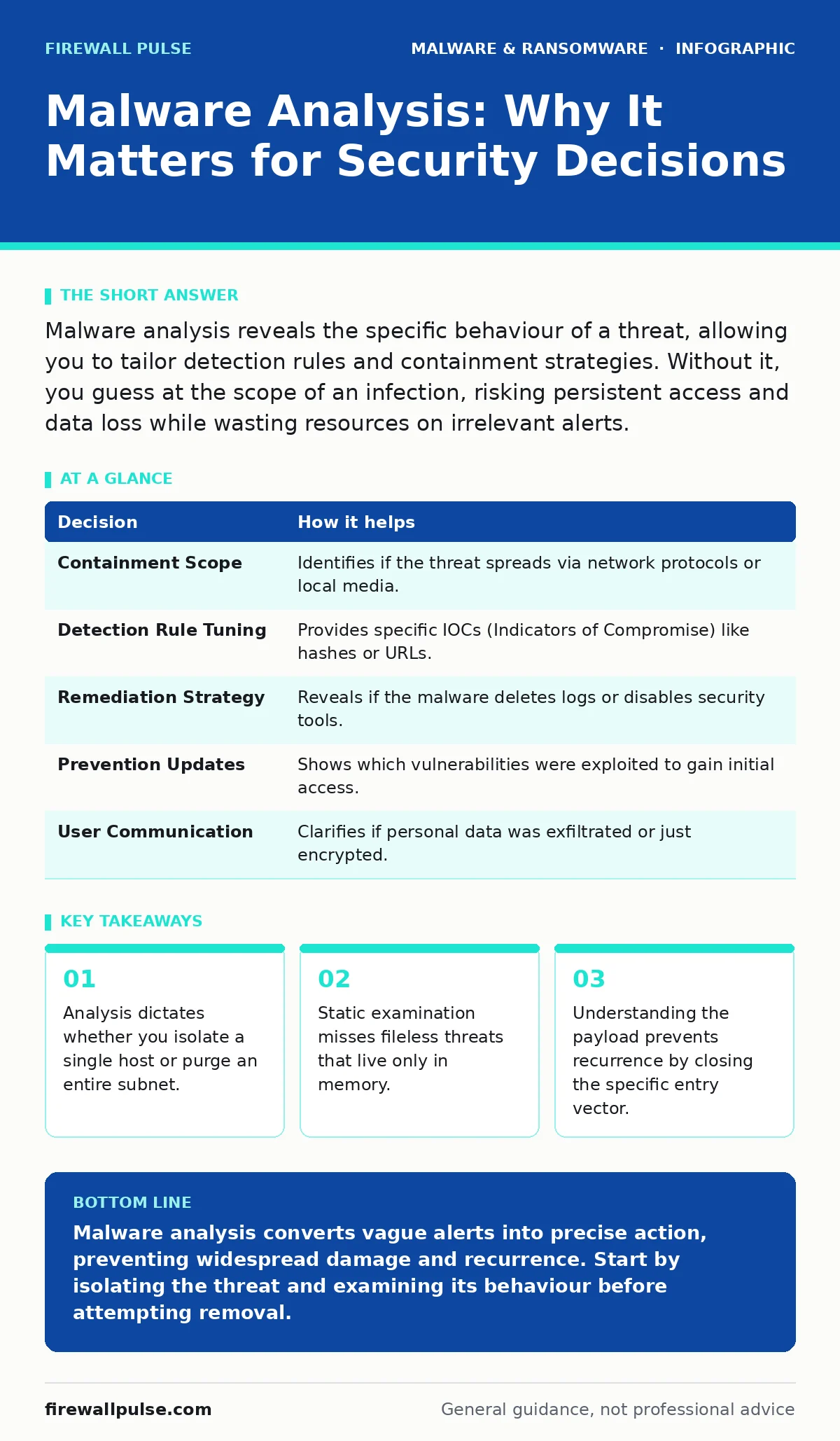
Malware analysis reveals the specific behaviour of a threat, allowing you to tailor detection rules and containment strategies. Without it, you guess at the scope of an infection, risking persistent access and data loss while wasting resources on irrelevant alerts.
The Anatomy of a Threat
Malware is not a monolith. It is a collection of instructions designed to perform unauthorised actions on your systems. Some variants steal credentials, others encrypt files, and some simply wait for further commands. Treating all malicious code as identical is a strategic error. You need to know what the code does, not just that it is bad.
The first step in any investigation is determining the scope. Is this a single infected workstation, or has the malware propagated laterally? The answer depends entirely on the behaviour of the payload. If the malware targets specific services, you can limit your response. If it spreads via network shares, you must assume wider compromise.
Static Versus Dynamic Analysis
Static analysis involves examining the malware without running it. You look at the code structure, strings, and imports. This method is safe and fast. It reveals obvious indicators like hardcoded IP addresses or known library calls. However, it fails against packed or obfuscated code. Packed malware compresses or encrypts its payload to hide its true nature until execution.
Dynamic analysis requires running the malware in a controlled environment. This is often called sandboxing. You observe what the program does: which files it creates, which registry keys it modifies, and which network connections it establishes. This reveals the true intent of the code. The trade-off is risk. If the sandbox is not perfectly isolated, the malware can escape.
Many modern threats detect sandbox environments. They behave benignly if they sense virtualisation or lack of user interaction. This is known as anti-analysis behaviour. You must combine both static and dynamic methods to see the full picture. Relying on one alone leaves blind spots.
The Decision Matrix
Every finding from your analysis informs a specific operational decision. You cannot make these decisions effectively if you only know that "malware was detected". You need to know the mechanism of infection and the persistence method. Persistence is how malware ensures it survives a reboot or a process kill.
| Decision | How it helps |
|---|---|
| Containment Scope | Identifies if the threat spreads via network protocols or local media. |
| Detection Rule Tuning | Provides specific IOCs (Indicators of Compromise) like hashes or URLs. |
| Remediation Strategy | Reveals if the malware deletes logs or disables security tools. |
| Prevention Updates | Shows which vulnerabilities were exploited to gain initial access. |
| User Communication | Clarifies if personal data was exfiltrated or just encrypted. |
The Cost of Ignorance
Without analysis, you are fighting a ghost. You might see symptoms like high CPU usage or strange network traffic, but you do not know the cause. Guessing leads to over-broad responses. You might shut down entire departments, causing significant operational disruption, only to find the issue was contained to one printer.
Conversely, you might under-react. If you assume a threat is isolated when it is not, it continues to operate. It may install a web shell, giving attackers remote access to your web servers. It might install stalkerware, which monitors user activity and captures screenshots. These secondary threats persist long after you think you have cleaned the system.
Persistence and Evasion
Malware authors know you will try to remove their code. They build in persistence mechanisms. These can include scheduled tasks, service installations, or modifications to the boot process. Some malware hides in legitimate system files, a technique known as fileless malware. It lives in memory and uses built-in system tools to execute its payload.
This is why checking for file hashes in malware detection is often insufficient. A fileless threat has no static file to hash. You must monitor for anomalous behaviour, such as PowerShell scripts executing unusual commands. Understanding the persistence method is key to ensuring the malware does not return after a reboot.
See also: Fast Flux DNS: How Attackers Hide Malware and How to Stop It · Threat Intelligence Platforms: 8 Practices for Actionable Data
Integrating Analysis into Operations
Analysis should not be a one-off event. It is part of a continuous cycle. You analyse a threat, update your detection rules, and then look for similar behaviour across your environment. This is threat hunting. You are no longer waiting for an alert; you are actively searching for signs of life based on what you know.
This approach aligns with broader security strategies. For instance, if you find ransomware, your response must include verifying your ransomware backups. If you find mobile malware, you must review your mobile device management policies. Each type of malware requires a specific counter-measure.
The Human Element
Automated tools can flag suspicious activity, but they struggle with context. They might flag a legitimate administrative script as malicious because it uses similar commands. This is a false positive. Manual analysis allows you to distinguish between a hacker and a sysadmin. It reduces alert fatigue by filtering out noise.
However, manual analysis is slow. It requires skilled personnel who understand operating systems and networking. You must balance speed with accuracy. In the early stages, use automated triage. For confirmed threats, switch to manual deep-dive analysis. This hybrid approach ensures you react quickly without sacrificing thoroughness.
Beyond the Immediate Threat
Malware analysis provides insights that go beyond the immediate incident. It reveals the tactics, techniques, and procedures of the attacker. This intelligence helps you predict future attacks. If an attacker uses a specific exploit to deliver malware, you can patch that vulnerability across your network.
This proactive stance is vital for long-term security. It turns a defensive reaction into a strategic advantage. You are not just cleaning up; you are hardening your defences against the next wave. This is the core reason why malware matters. It is not just about removing bad code; it is about understanding the enemy.
Key takeaways
- Analysis dictates whether you isolate a single host or purge an entire subnet.
- Static examination misses fileless threats that live only in memory.
- Understanding the payload prevents recurrence by closing the specific entry vector.
Malware analysis converts vague alerts into precise action, preventing widespread damage and recurrence. Start by isolating the threat and examining its behaviour before attempting removal.
Frequently asked questions
How do I analyse malware safely?
Use a disconnected virtual machine with snapshot capabilities. Record all changes the malware makes, then revert the snapshot after testing.
Can automated tools replace manual analysis?
No. Automated tools handle volume and repetition, but manual analysis provides context and identifies novel threats that evade signatures.
What is the first thing to look for in malware?
Look for network connections. If the malware contacts a command-and-control server, blocking that traffic stops further instructions.
Does deleting the malware file stop the threat?
Not necessarily. Check for persistence mechanisms like scheduled tasks or registry keys that can re-download or re-execute the malware.
How this guide was produced: written by the Firewall Pulse editorial team with AI assistance, checked against the public references listed below, and reviewed when the facts change. See our editorial policy or report an error.