Out-of-band patches: what small businesses need to know
Emergency updates bypass standard testing cycles, creating a high risk of system instability if applied without rigorous validation procedures.
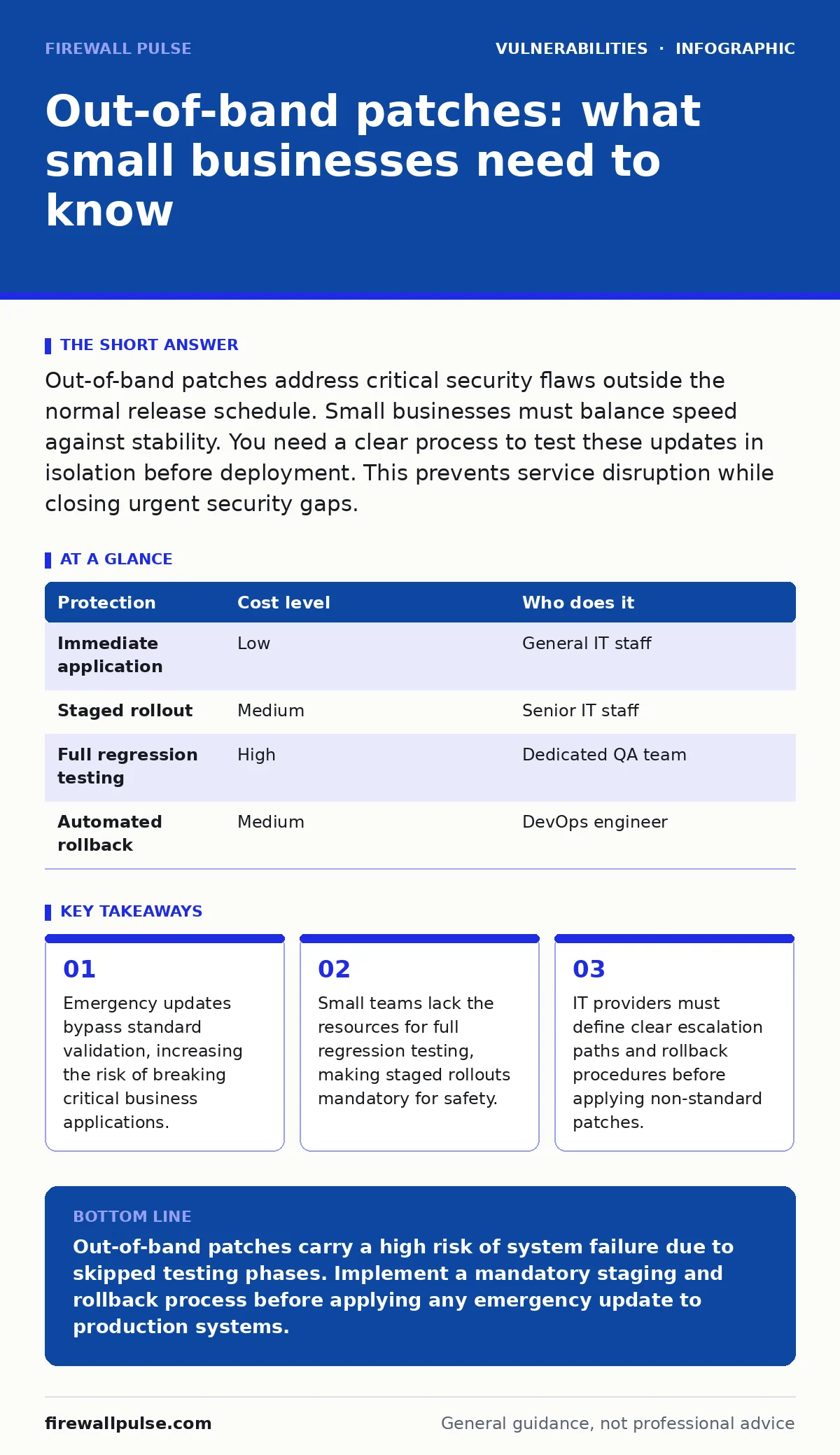
Out-of-band patches address critical security flaws outside the normal release schedule. Small businesses must balance speed against stability. You need a clear process to test these updates in isolation before deployment. This prevents service disruption while closing urgent security gaps.
Why out-of-band patches differ from routine updates
Routine security patches follow a predictable schedule. Vendors test these updates for compatibility with previous versions and common software configurations. Out-of-band patches, also known as emergency or critical updates, arrive unexpectedly. They address severe vulnerabilities that allow remote code execution or data theft. These patches skip the standard testing cycle. The vendor prioritises speed over stability to stop active exploitation.
This speed creates a hidden cost for small organisations. Routine patches have known failure modes documented in vendor notes. Emergency patches often lack detailed compatibility matrices. You face a higher probability of breaking existing functionality. The trade-off is immediate protection against a known threat versus potential operational downtime. Small businesses cannot absorb days of lost productivity. You must treat these updates as high-risk change events, not routine maintenance.
The specific risks for small-scale operations
Small teams often lack dedicated security operations centres. They rely on generalist IT staff who manage servers, networks and helpdesk tickets. When an out-of-band patch arrives, the pressure to apply it immediately is immense. The fear of a breach drives hasty decisions. This haste bypasses the change management for security patches process that usually protects the environment.
Without a staging environment, you apply patches directly to production systems. If the patch conflicts with a custom script or a legacy application, the system fails. There is no easy way to revert. Small businesses often run monolithic systems where one broken server stops the entire office. The risk is not just the vulnerability, but the patch itself. You must weigh the severity of the flaw against the fragility of your infrastructure.
Assessing the urgency of the update
Not all emergency patches require immediate action. You must assess the threat context. Is the vulnerability being actively exploited in the wild? Is your system exposed to the internet? Does the flaw allow unauthenticated access? These questions determine the window of risk.
Use the EPSS score to gauge the likelihood of exploitation. This metric provides a probability that a vulnerability will be exploited. A high score indicates immediate danger. A low score suggests you have time to test. Combine this with the risk-based vulnerability management approach. Prioritise patches that affect internet-facing services. Internal-only systems with strict least privilege access controls may withstand a short delay while you validate the update.
Practical steps for applying emergency fixes
You need a disciplined process for out-of-band patches. Speed without control leads to outages. Follow this sequence to minimise risk.
- Isolate the patch. Download the update to a secure location. Do not apply it to any live system yet.
- Test in a sandbox. Use a virtual machine that mirrors your production environment. Install the patch and check core functions.
- Verify compatibility. Ensure critical applications start and run correctly. Check for error logs.
- Prepare a rollback plan. Create a system image or snapshot before deployment. This allows you to revert if the patch fails.
- Deploy in stages. Update one non-critical server first. Monitor for issues for 24 hours. Then proceed with the rest.
This process adds time but prevents catastrophic failure. It transforms a reactive panic into a controlled operation. You maintain security posture without sacrificing availability.
| Protection | Cost level | Who does it |
|---|---|---|
| Immediate application | Low | General IT staff |
| Staged rollout | Medium | Senior IT staff |
| Full regression testing | High | Dedicated QA team |
| Automated rollback | Medium | DevOps engineer |
What to ask your IT provider
Many small businesses outsource their IT management. Your provider must have a clear policy for out-of-band patches. Do not assume they handle these updates with care. Ask specific questions to verify their competence.
- How do you validate an emergency patch before deployment?
- What is your rollback procedure if the patch breaks a service?
- Do you test patches in a staging environment that matches our production?
- How do you communicate the urgency and risk to us?
- What is the maximum acceptable downtime for a patch failure?
These questions reveal whether they treat security as a checkbox or a process. A provider who cannot answer these clearly is a liability. They may apply patches blindly, risking your operations. You need a partner who balances speed with stability.
See also: Patch Change Management: Seven Rules to Reduce Risk
Integrating with broader security strategy
Out-of-band patches are part of a larger defence. They address specific flaws but do not fix poor architecture. You must combine patching with other controls. Zero-day vulnerabilities often require patches that do not yet exist. In these cases, you rely on detection and isolation.
Use-after-free vulnerabilities are common in complex software. Patches for these are frequent and critical. Ensure your systems are updated regularly to reduce the attack surface. N-day vulnerabilities are flaws for which patches are available but not yet applied. These are the easiest to fix but often ignored. Out-of-band patches reduce the window for these attacks.
Dependency confusion attacks exploit software supply chains. Patching the core application may not fix the underlying dependency issue. You must monitor your software stack closely. Change management for security patches ensures that every update, routine or emergency, is tracked and validated. This discipline prevents chaos during crises.
The hidden cost of constant emergency updates
Frequent out-of-band patches indicate a deeper problem. If you are constantly reacting to critical flaws, your software stack is too complex or too outdated. Each emergency update consumes time and resources. It disrupts workflow and stresses staff.
The hidden cost is technical debt. You spend more time fixing breakages caused by patches than you do on strategic improvements. This cycle erodes trust in your IT function. Staff begin to fear updates. They delay routine maintenance, increasing risk further.
Break this cycle by simplifying your environment. Standardise on fewer platforms. Automate testing where possible. Invest in risk-based vulnerability management to prioritise effectively. Reduce the need for emergency action by maintaining a healthy, updated baseline.
Key takeaways
- Emergency updates bypass standard validation, increasing the risk of breaking critical business applications.
- Small teams lack the resources for full regression testing, making staged rollouts mandatory for safety.
- IT providers must define clear escalation paths and rollback procedures before applying non-standard patches.
Out-of-band patches carry a high risk of system failure due to skipped testing phases. Implement a mandatory staging and rollback process before applying any emergency update to production systems.
Frequently asked questions
How do I know if a patch is truly critical?
Check the vendor advisory for details on exploitation. Look for indicators of active wild exploits and high severity ratings. Cross-reference with threat intelligence feeds to confirm real-world risk.
Can I automate out-of-band patching?
Automation is risky for emergency updates. Automated systems lack the context to judge compatibility. Use automation for routine patches only. Keep emergency patches under manual control to ensure proper validation and rollback readiness.
What if my IT provider refuses to test patches?
This is a major red flag. A provider who skips testing endangers your operations. You should request a change in procedure or consider finding a new partner who prioritises stability alongside security.
How long should I wait before applying an emergency patch?
The wait time depends on risk. If active exploitation is confirmed, apply within hours after quick validation. If the risk is theoretical, wait 24 to 48 hours to gather community feedback on stability issues.
How this guide was produced: written by the Firewall Pulse editorial team with AI assistance, checked against the public references listed below, and reviewed when the facts change. See our editorial policy or report an error.