Cisco IOS XE Vulnerabilities Explained Simply
Network software flaws allow attackers to bypass security controls without breaking physical locks, exposing data flows to interception or disruption.
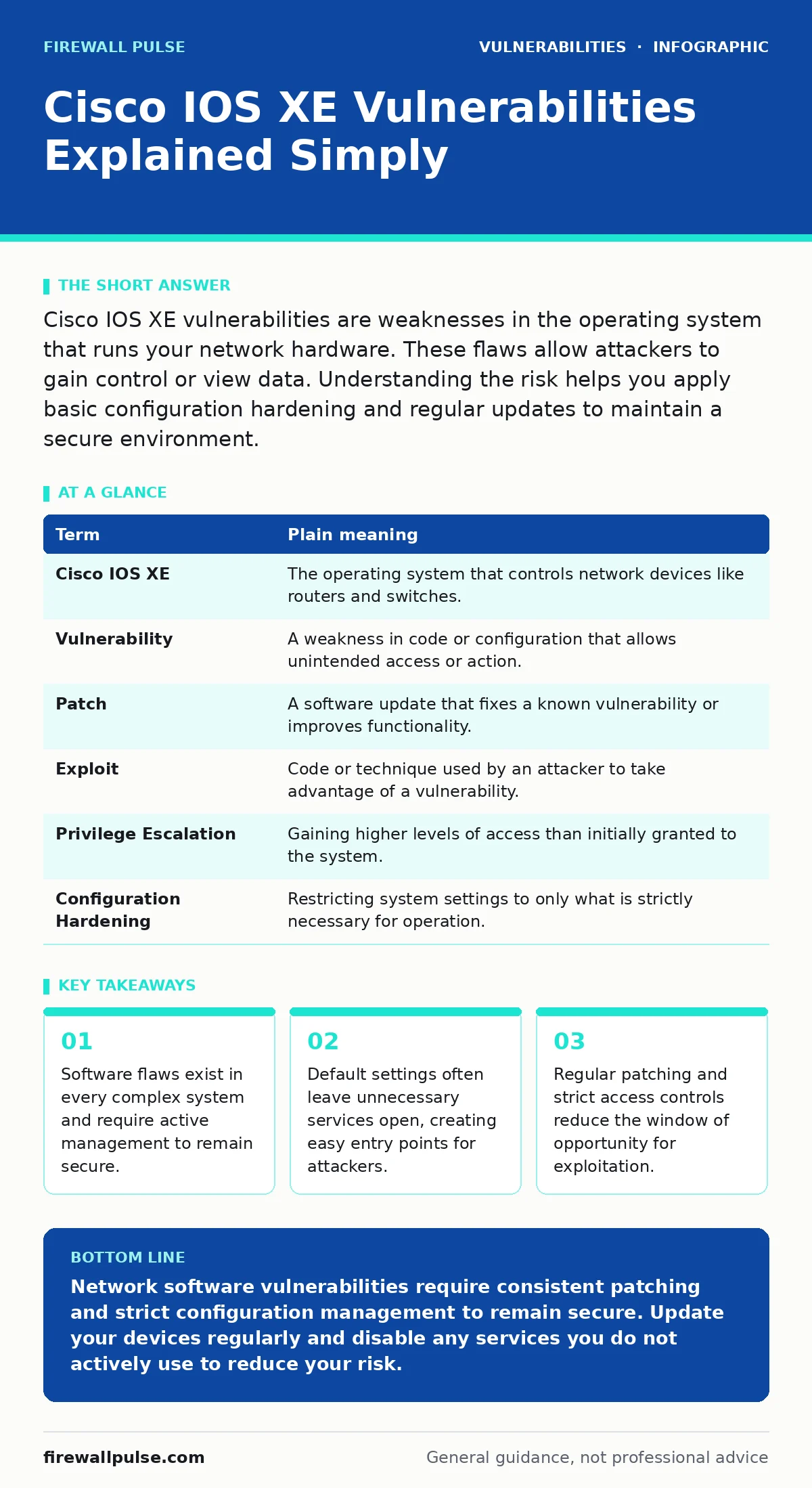
Cisco IOS XE vulnerabilities are weaknesses in the operating system that runs your network hardware. These flaws allow attackers to gain control or view data. Understanding the risk helps you apply basic configuration hardening and regular updates to maintain a secure environment.
The Post Office Analogy
Imagine a busy post office where letters represent your data. The building structure is the hardware, while the staff procedures are the software. Cisco IOS XE is the set of rules the staff follows to sort and deliver mail. A vulnerability is a gap in these rules. Suppose a rule says "check ID only for international mail". A local sender with malicious intent could exploit this gap to insert harmful packages into outgoing deliveries. The building remains locked, but the process fails.
Key Terms for Beginners
Understanding the language helps you navigate technical discussions. These definitions clarify the components involved in network security.
| Term | Plain meaning |
|---|---|
| Cisco IOS XE | The operating system that controls network devices like routers and switches. |
| Vulnerability | A weakness in code or configuration that allows unintended access or action. |
| Patch | A software update that fixes a known vulnerability or improves functionality. |
| Exploit | Code or technique used by an attacker to take advantage of a vulnerability. |
| Privilege Escalation | Gaining higher levels of access than initially granted to the system. |
| Configuration Hardening | Restricting system settings to only what is strictly necessary for operation. |
What This Means for You
You do not need to be a network engineer to understand the risk. When software has a vulnerability, the barrier between your data and an attacker weakens. Ordinary users care about privacy and uptime. If a router is compromised, your internet connection may slow down or drop entirely. More seriously, attackers can intercept unencrypted data passing through the device. This is similar to someone stealing letters from the sorting table before they are sealed in envelopes.
The impact depends on how exposed the device is. If the router faces the public internet, the risk is higher. If it sits behind a firewall, the risk is lower but not zero. Configuration hardening reduces the surface area available for attack. By turning off unused services, you remove doors that an attacker might try to kick open.
The Hidden Cost of Defaults
Many users assume that factory settings are safe. This is a common misconception. Default configurations often enable services for ease of setup, not for security. These extra services consume resources and provide additional entry points. Suppose you buy a smart lock that comes with a backdoor key for the installer. If you do not remove that key, anyone who knows about it can enter your home.
Vulnerabilities in VPN appliances often stem from similar default misconfigurations. When you set up new hardware, you must review every setting. Disable any feature you do not actively use. This practice, known as configuration hardening, ensures that only necessary functions remain active. It reduces the number of places an attacker can look for weaknesses.
Simple Safety Habits
You can protect your network with a few consistent actions. These habits require minimal technical skill but provide significant security benefits.
- Update your firmware regularly. Manufacturers release patches to fix discovered vulnerabilities. Applying these updates closes known gaps in the software.
- Change default passwords immediately. Use strong, unique credentials for administrative access. This prevents attackers from using common login attempts.
- Enable logging and monitoring. Keep a record of who accesses the device and when. This helps you detect unusual activity early.
These steps mirror the advice for IoT device patching. Small, regular updates prevent large, catastrophic breaches. Do not wait for a crisis to update your systems. Proactive maintenance is cheaper and less disruptive than reactive recovery.
See also: Why is a syn flood attack detectable? The mechanics of detection · Fast Flux DNS: How Attackers Hide Malware and How to Stop It
Understanding Severity Scores
Not all vulnerabilities are equal. Some allow full control of the device, while others only reveal minor information. Security experts use scoring systems to rank severity. A CVSS score helps you prioritise which patches to apply first. A high score indicates a critical flaw that requires immediate attention. A low score might be acceptable to defer until the next maintenance window.
This ranking system helps you manage limited resources. You cannot patch everything at once. Focus on the highest risks first. This approach is similar to triage in a hospital. Patients with the most serious conditions receive care before those with minor injuries.
The Role of External Tools
You cannot see every flaw in your software. External perspectives help identify weaknesses you might miss. Vulnerability scanning tools automatically check your systems against known databases of flaws. These tools provide a report of potential issues. They do not fix the problems, but they highlight where to focus your efforts.
Imagine a security guard walking through the post office with a checklist. They point out unlocked drawers and missing signs. You still need to lock the drawers and post the signs. Scanning is the inspection; patching is the repair. Combine both for effective security.
Beyond the Network Layer
Network security is only one layer of defence. Applications running on your servers may have their own weaknesses. Cross-site scripting (XSS) is a common web application flaw that allows attackers to inject malicious scripts. PHP object injection is another risk in web applications using the PHP language. Dependency confusion attacks exploit the way software libraries are loaded.
These application-level risks are separate from network firmware issues. However, they often combine to create complex attack chains. An attacker might use a network vulnerability to reach a web server, then exploit an application flaw to steal data. Defence in depth requires securing both the network and the applications it serves.
Key takeaways
- Software flaws exist in every complex system and require active management to remain secure.
- Default settings often leave unnecessary services open, creating easy entry points for attackers.
- Regular patching and strict access controls reduce the window of opportunity for exploitation.
Network software vulnerabilities require consistent patching and strict configuration management to remain secure. Update your devices regularly and disable any services you do not actively use to reduce your risk.
Frequently asked questions
How do I know if my Cisco IOS XE version is vulnerable?
Check the release notes from the manufacturer for known issues. Compare your current version number with the list of affected versions provided in security advisories.
Can I fix a vulnerability without rebooting the device?
Some minor patches can be applied without a reboot. Major version upgrades usually require a restart, which takes the device offline temporarily. Plan maintenance windows accordingly.
Does a firewall protect me from IOS XE vulnerabilities?
A firewall blocks unauthorized network traffic but cannot fix flaws in the device's own software. If the device itself is compromised, the firewall may be bypassed or misconfigured.
Should I turn off all remote management features?
Turning off remote management improves security by removing a potential entry point. However, it makes maintenance difficult. Use a secure, restricted management network if you must keep remote access enabled.
How this guide was produced: written by the Firewall Pulse editorial team with AI assistance, checked against the public references listed below, and reviewed when the facts change. See our editorial policy or report an error.